
Instructions for using the WildFireWeb® Content Management System
Outlook Express
Instructions for Configuring Outlook Express running on Windows, to access your mail account hosted on the WildFireWeb servers.
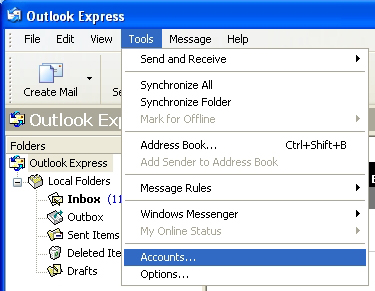
In Outlook Express, Select "Accounts" from the Tools menu
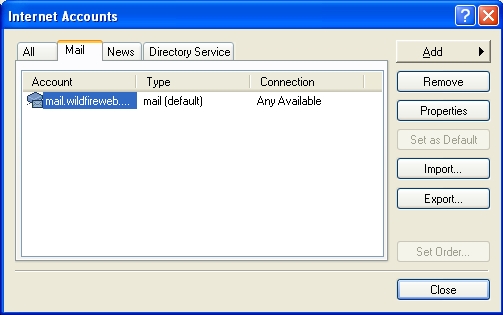
If you already have an email account, and you are changing the settings
to access the wildfireweb mail server, click on the name of the account and
click the "properties" button.
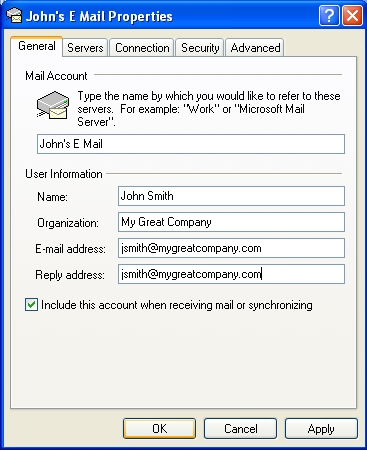
Enter the name of your account on the first line (this is the account display name and should be something that makes sense to you)
1 - Name: Enter your full name
2 - Organization: The name of your company if you have one, otherwise leave this blank
3 - E Mail Adress: Enter your full e mail address
4 - Reply Address: Usually the same as your full e mail address
5 - Check the box "Include this account when receiving mail or syncronizing"
6 - Click the "Apply" button
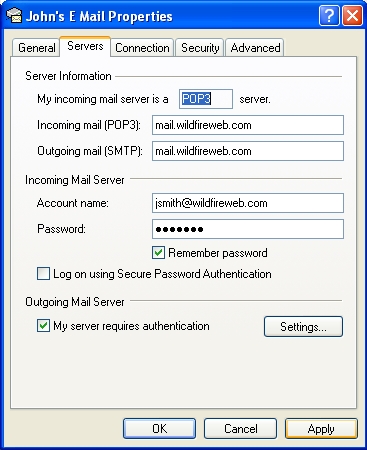
1 - Click the "Servers" tab at the top of the window
2 - Enter the incoming (pop) and outgoing (smtp) mail server information.
**If you have your own domain, you will substitute "wildfireweb.com" with your own domain name, for instance, if your domain name is greatrentals.com, your incoming and outgoing mail servers would be set to mail.greatrentals.com
3 - Next, enter your account name (this is exactly the same as your full email address)
4 - Enter your password
5 - Click "Remember password" if you want Outlook Express to enter the password for you when sending and receiving mail.
6 - In the bottom section, check the "My server requires authentication"
7 - Click the "Apply" button
8 - Click the "Settings" button
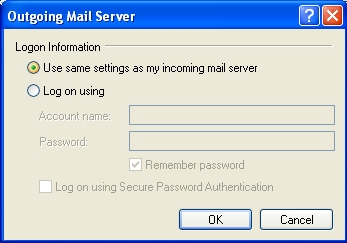
If it's not already selected, click the "Use same settings as my incoming mail server" button.
9 - Click "OK"
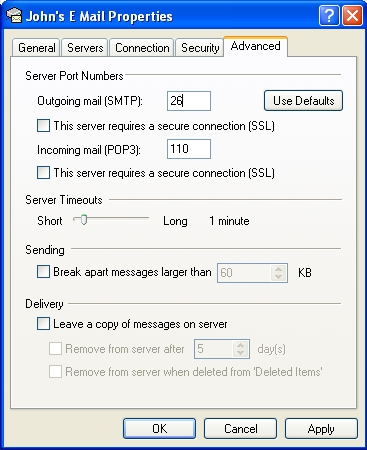
You will be returned to the E Mail properties window.
1 - Click the "Advanced" tab
2 - Very Important! Change the "Outgoing Mail (SMTP) server port from 25 to 26
*all other settings should be just as they appear here.
Click "Apply" then click "OK"
Click "OK" to exit and close any open windows.
Congratulations!
Outlook Express is now configured to check your mail on the WildFireWeb severs.
Instructions for Configuring Outlook Express running on Windows, to access your mail account hosted on the WildFireWeb servers.
In Outlook Express, Select "Accounts" from the Tools menu
If you already have an email account, and you are changing the settings
to access the wildfireweb mail server, click on the name of the account and
click the "properties" button.
Enter the name of your account on the first line (this is the account display name and should be something that makes sense to you)
1 - Name: Enter your full name
2 - Organization: The name of your company if you have one, otherwise leave this blank
3 - E Mail Adress: Enter your full e mail address
4 - Reply Address: Usually the same as your full e mail address
5 - Check the box "Include this account when receiving mail or syncronizing"
6 - Click the "Apply" button
1 - Click the "Servers" tab at the top of the window
2 - Enter the incoming (pop) and outgoing (smtp) mail server information.
**If you have your own domain, you will substitute "wildfireweb.com" with your own domain name, for instance, if your domain name is greatrentals.com, your incoming and outgoing mail servers would be set to mail.greatrentals.com
3 - Next, enter your account name (this is exactly the same as your full email address)
4 - Enter your password
5 - Click "Remember password" if you want Outlook Express to enter the password for you when sending and receiving mail.
6 - In the bottom section, check the "My server requires authentication"
7 - Click the "Apply" button
8 - Click the "Settings" button
If it's not already selected, click the "Use same settings as my incoming mail server" button.
9 - Click "OK"
You will be returned to the E Mail properties window.
1 - Click the "Advanced" tab
2 - Very Important! Change the "Outgoing Mail (SMTP) server port from 25 to 26
*all other settings should be just as they appear here.
Click "Apply" then click "OK"
Click "OK" to exit and close any open windows.
Congratulations!
Outlook Express is now configured to check your mail on the WildFireWeb severs.